
cmux
The terminal built for
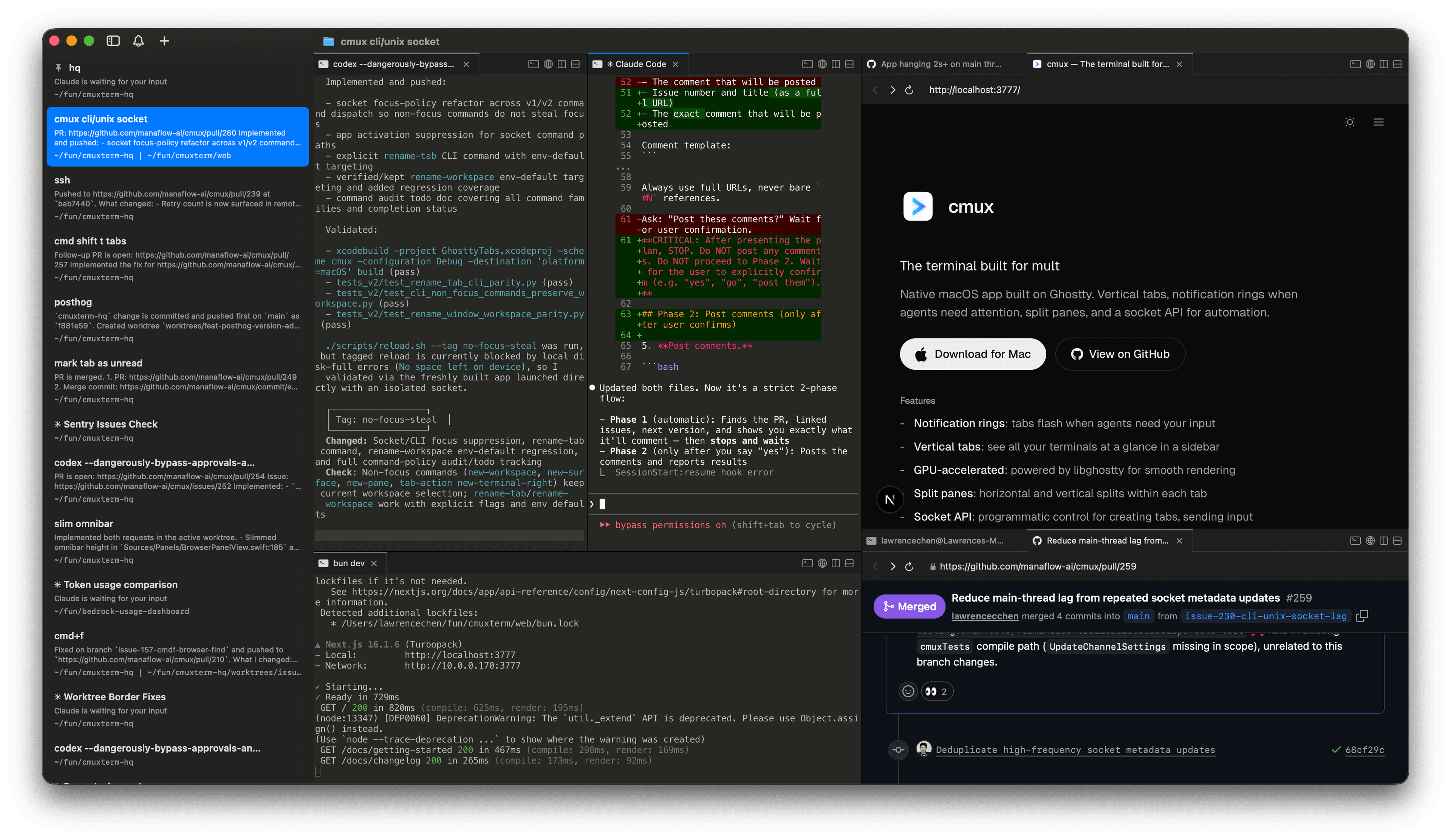
Native macOS app built on Ghostty. Vertical tabs, notification rings when agents need attention, split panes, and a socket API for automation.
Features
- -Vertical tabs: sidebar shows git branch, working directory, ports, and notification text
- -Notification rings: panes light up when agents need attention
- -In-app browser: split a browser alongside your terminal with a scriptable API
- -Split panes: horizontal and vertical splits within each tab
- -Scriptable: CLI and socket API for automation and scripting
- -GPU-accelerated: powered by libghostty for smooth rendering
- -Lightweight: native Swift + AppKit, no Electron
- -Keyboard shortcuts: extensive shortcuts for workspaces, splits, browser, and more
FAQ
How does cmux relate to Ghostty?
cmux is not a fork of Ghostty. It uses libghostty as a library for terminal rendering, the same way apps use WebKit for web views. Ghostty is a standalone terminal; cmux is a different app built on top of its rendering engine.
What platforms does it support?
macOS only, for now. cmux is a native Swift + AppKit app.
What coding agents does cmux work with?
All of them. cmux is a terminal, so any agent that runs in a terminal works out of the box: Claude Code, Codex, OpenCode, Gemini CLI, Kiro, Aider, Goose, Amp, Cline, Cursor Agent, and anything else you can launch from the command line.
How do notifications work?
When a process needs attention, cmux shows notification rings around panes, unread badges in the sidebar, a notification popover, and a macOS desktop notification. These fire automatically via standard terminal escape sequences (OSC 9/99/777), or you can trigger them with the cmux CLI and Claude Code hooks.
Can I customize keyboard shortcuts?
Terminal keybindings are read from your Ghostty config file (~/.config/ghostty/config). cmux-specific shortcuts (workspaces, splits, browser, notifications) can be customized in Settings. See the default shortcuts for a full list.
How does it compare to tmux?
tmux is a terminal multiplexer that runs inside any terminal. cmux is a native macOS app with a GUI: vertical tabs, split panes, an embedded browser, and a socket API are all built in. No config files or prefix keys needed.
Is cmux free?
Yes, cmux is free to use. The source code is available on GitHub.
Community
- "Another day another libghostty-based project, this time a macOS terminal with vertical tabs, better organization/notifications, embedded/scriptable browser specifically targeted towards people who use a ton of terminal-based agentic workflows." —
 Mitchell Hashimoto, Creator of Ghostty and founder of HashiCorp
 - "This is exactly the product I've been looking for. After two hours this am I've in love." —
 Nick Schrock, Creator of Dagster. GraphQL co-creator.
 - "I've been using this all weekend and it's amazing." —
 Edward Grefenstette, Director of Research at Google DeepMind
 - "this has been my favorite tool for past two weeks" —
 Max Forsey
 - "cmux 良さそうすぎてついにバイバイ VSCode するときなのかもしれない" — cmux looks so good it might finally be time to say goodbye to VSCode —
 あさざ
あさざ - "Hey, this looks seriously awesome. Love the ideas here, specifically: the programmability, layered UI, browser w/ api. Looking forward to giving this a spin. Also want to add that I really appreciate Mitchell Hashimoto creating libghostty; it feels like an exciting time to be a terminal user." —johnthedebs
- "Vertical tabs in my terminal 🤤 I never thought of that before. I use and love Firefox vertical tabs." —
 Joe Riddle
 - "Gave this a run and it was pretty intuitive. Good work!" —dchu17
- "I like it, ran it in the past day on three parallel projects each with several worktrees. Having this paired with lazygit and yazi / nvim made me a bit more productive than usual without having to chase multiple ghostty / iTerm instances. Also feels more natural than tmux." —afruth
- "cmux良さそうなので入れてみたけれど、良い" — Tried cmux since it looked good — it's good —
 Norihiro Narayama
 - "cmux is pretty good." —
 Kishore Neelamegam
 - "cmux.dev に乗り換えた" — Switched to cmux.dev —
 かたりん
かたりん - "This has been such a useful find. I can't recommend it enough." —
 Scott Watermasysk
 - "grabbed this over the weekend and loved it. been waiting for something like this." —
 John Blythe
 - "This is exactly what I've wanted. Amazing job thank you!" —
 Christopher
 - "Been using this for a week and it's fantastic. Vert tab for each WIP task. Inside, claudes on one side and browser with PR and resources on the other, switch between tasks and stay organized. Mix that with skills to have Claude watch CI recursively, etc. feeling enlightened tbh" —
 Connor
 - "年初にWarpからGhosttyに乗り換えたけど、今はcmuxに乗り換えた💻 垂直タブが便利で、Claude Codeのタスクの終了が通知されるのがありがたい。Ghosttyベースだから爆速動作はそのまま。ghosttyでやったブランチ表示や補完もそのまま使える" — I switched from Warp to Ghostty at the start of the year, but now I've switched to cmux. The vertical tabs are convenient, and I appreciate getting notified when Claude Code tasks finish. It's Ghostty-based so the blazing fast performance carries over. Branch display and completions I set up in Ghostty still work too. —
 鹿野 壮 Takeshi Kano